
Hub Creation setup
Article QIWpkK4B · sourceDescription: Hubs are the location where pick, pack and deliver products are processed in less than an hour. Quick commerce relies on local warehouses which can serve people in immediate proximity.
Hub Creation setup
- Click on the hamburger menu () → Hub()
→ To create a new hub.
-
Click on ADD NEW button.
-
Method 1- New Hub option → A form shall appear with required fields. This method is used to create a single vehicle make.-
Fill up the form and click on Add button.
-
You’ve successfully added a vehicle make.
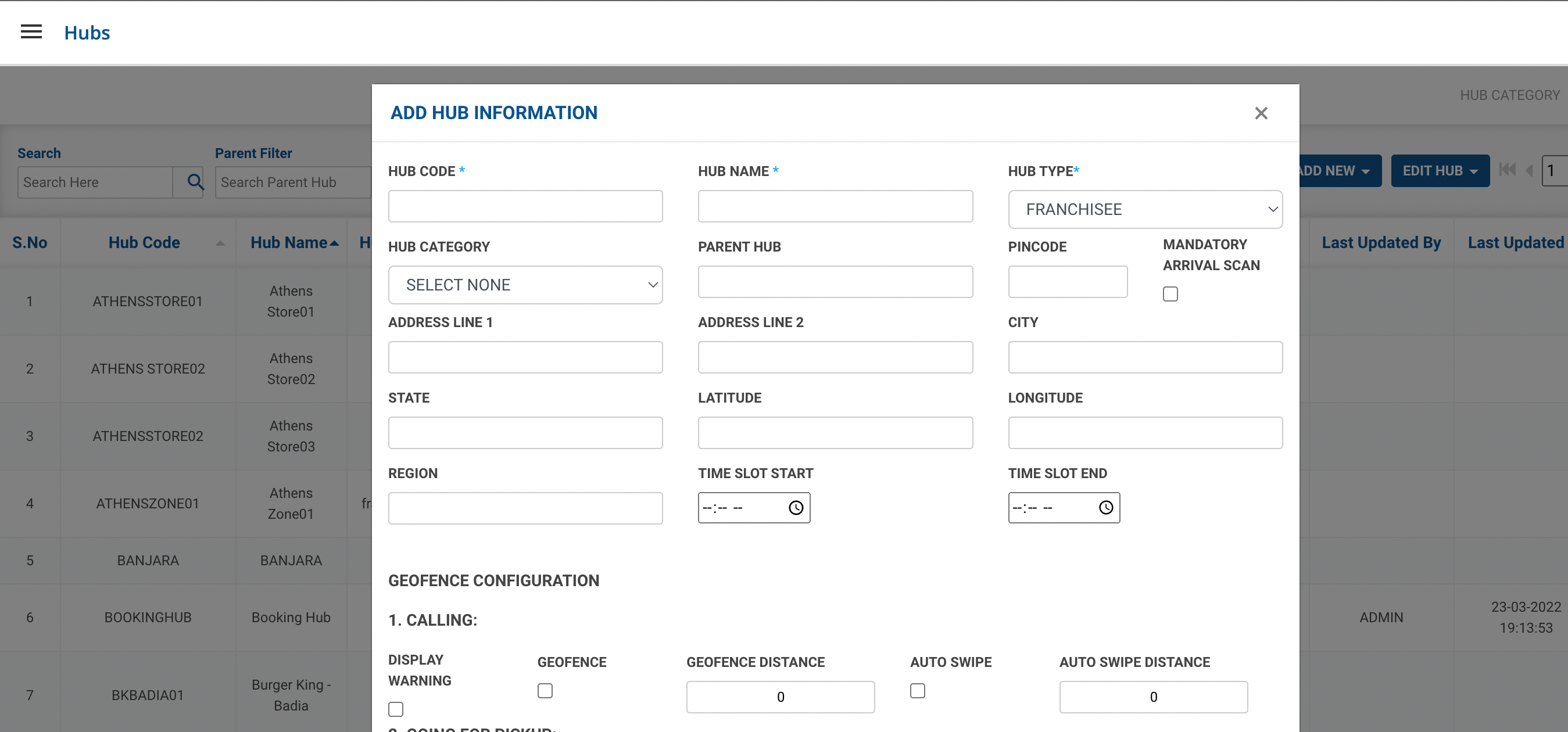
-
| Field | Description | Input Value |
| Hub Code | Hub Identification Code | String |
| Hub Name | Name of the Hub | String |
| Hub Type | Select the Hub Type | Drop Down |
| Hub Category | Select the Hub Category | Drop Down |
| Parent Hub | Add Hub Code for Parent Hub | String |
| Area Code | ||
| Mandatory Arrival Scan | ||
| Address Line 1 | Add Hub Location Address | String |
| Address Line 2 | Add Hub Location Address | String |
| City | Add Hub City Name | String |
| Latitude | Location Latitude of the hub | Number |
| Longitude | Location Longitude of the Hub | Number |
| Local trip vehicle Speed (km/hr) | ||
| Upcountry Trip Vehicle Speed (km/hr) | ||
| Region | Hub Area Region | String |
| Time Slot Start | Start time of Hub Working | Drop Down |
| Time Slot End | Closing time of Hub | Drop Down |
| Name | Name of Hub manager | String |
| Phone | Phone of Hub manager | Number |
| Email id of Hub manager | String |
Was this article helpful?