
Planned shift for the rider
Article LUDqZFWx · sourceDescription : Planned Roster is the planned shifts created for the rider to work in those planned hours in the day.
→ To create a planned shift .
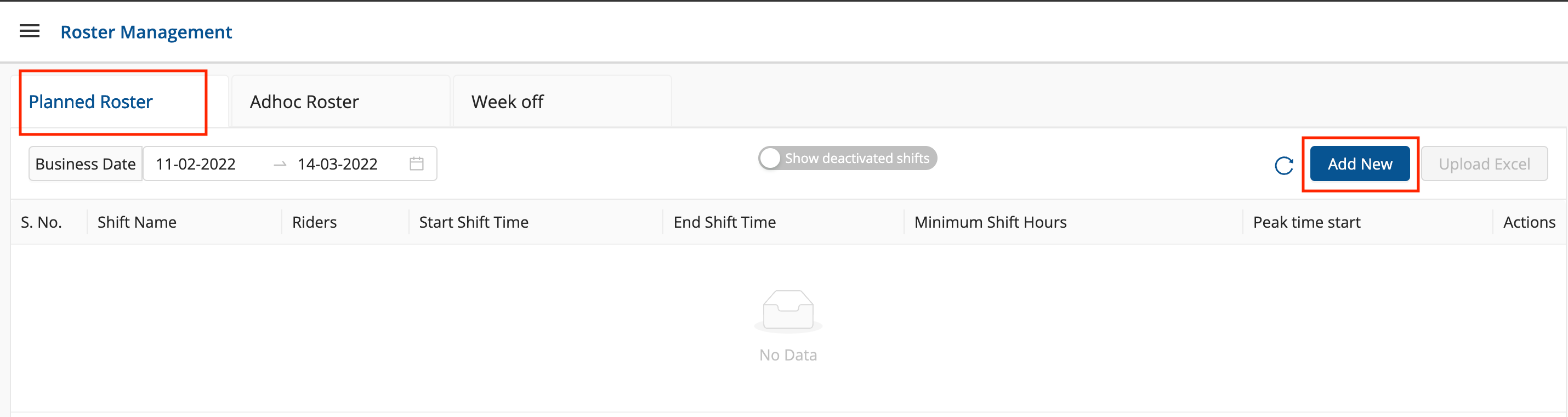
- Click on hamburger menu () → Roster Management.
- Select the Planned Tab → Click on Add New Button.
- Fill up the form and click on Submit and Broadcast button.
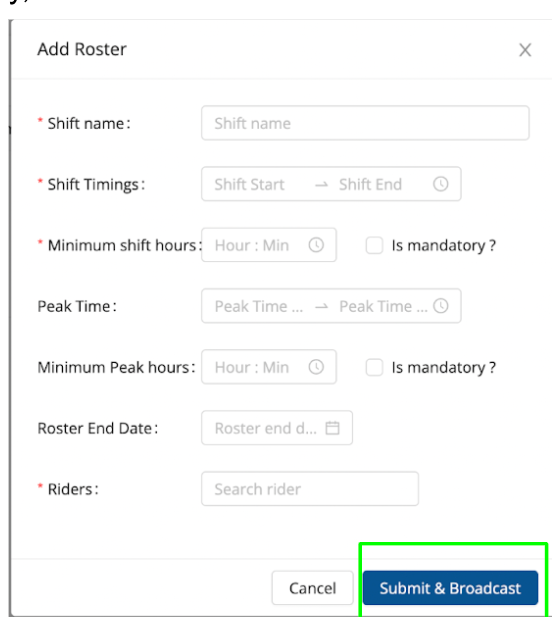
| Field | Description | Input Value |
| Shift Name | Name of Shift | String |
| Shift Timing | Start and End time of the Shift | String |
| Minimum Shift Hours | Minimum Range of hours Rider should attend the shift | String |
| Is Mandatory ? | Mandatory for Rider to be present between the minimum Shift Hours. | CheckBox |
| Peak Timing | Start and End time of the Peak Time (Rush Hour between the complete shift timing) | String |
| Minimum Peak Hours | Minimum Range of Peak hours notify Riders that more man power will be required in store between that timing. | String |
| Is Mandatory ? | Mandatory for Rider to be present between the minimum Peak Hours. | CheckBox |
| Roster End Timing | End Date for this Planned Shift | String |
| Rider | Map Rider against the shift created | String |
Was this article helpful?