
Creation via Dashboard:
Article efdPLAzd · sourceVirtual Series can be created either from
- Dashboard
- API
Creation via Dashboard:
-
Go to Setup → Customer → Customer Management
-
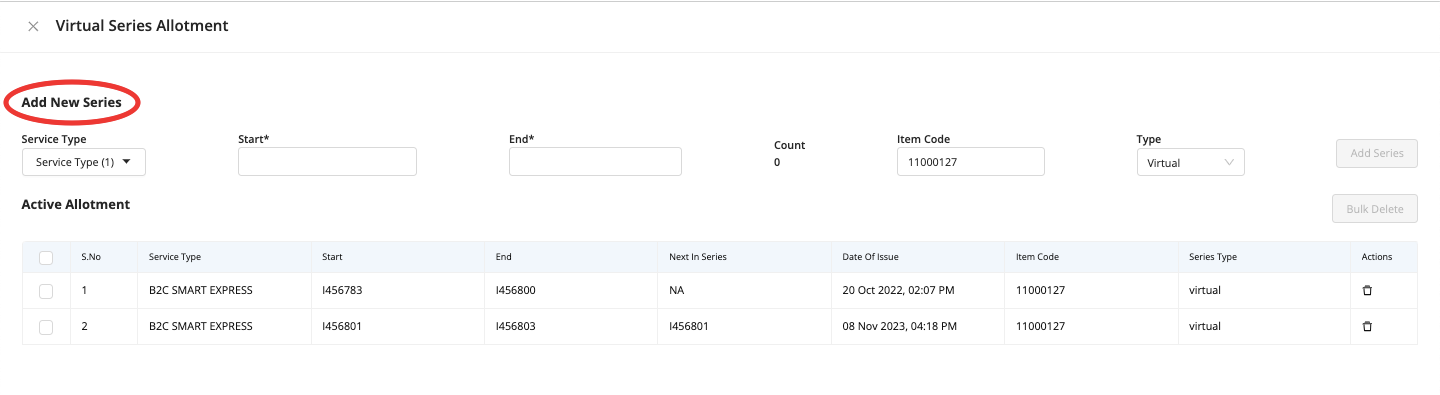
Search the desired Customer → click on Virtual series icon on the right side menu, this redirects the user to the Virtual Series Allotment screen:
-
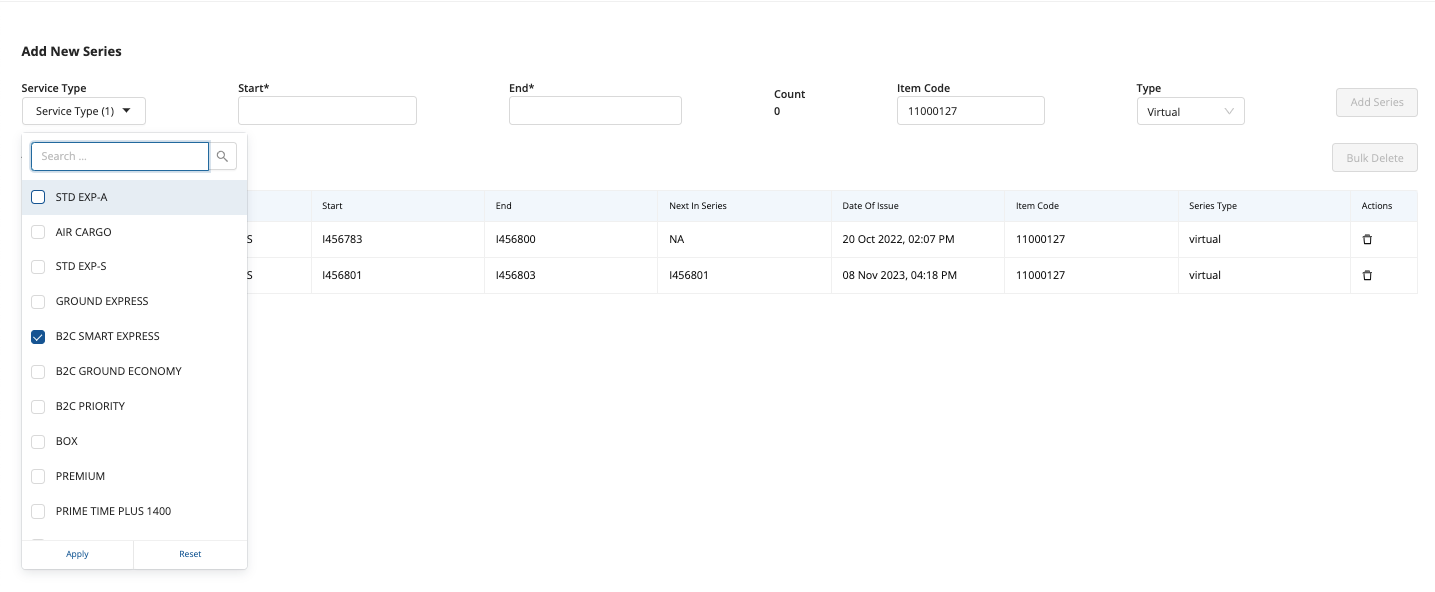
User needs to chose the specific service type(s) that need to be configured for virtual series (this is typically related to the carrier's services and offerings):
-
Fill in the other details- start & end no. of the series, count will be auto-fetched, item code to be given (mandatory) and click on ‘Add series’:
-
Once done, the page will show the notification as - series added successfully:
Creation via API:
Request Information
| Category | Value |
|---|---|
| Method | POST |
| Url | {baseurl}/api/client/integration/virtualseries/create |
Headers
| Key | Value |
|---|---|
| Authorization | Basic <API KEY> |
| Content-Type | application/json |
Add <API KEY> to authenticate.
<API KEY> will be shared privately.
Input fields:
| Key Name | Description | Data Type | Required Key | Remarks | |
|---|---|---|---|---|---|
| 1 | client_code | Client Code | string | Optional* | "GL438" |
| 2 | type | Type of series | string | Optional | Allowed values - ["physical", "virtual"]. If nothing is passed, defaults to “virtual” |
| 3 | start | Series Start | string | Required | "V10000051" |
| 4 | end | Series End | string | Required | "V10000060" |
| 5 | item_code | Item Code | string | Required | "P7WJEJANkt" |
| 6 | hub_code | Hub Code | string | Optional* | "BF074" |
| 7 | creator_hub | Creator Hub | string | Optional | “BLR” |
*Either client_code or hub_code should be present in the request. If both are passed, priority is given to client_code
Response Codes:
| Response Code | Remarks |
|---|---|
| 200 | Successful request. |
| 400 | There is some validation error in the overall request format. In this case, complete request is rejected. |
| 401 | There is an authentication error. |
Sample Payload:yl
{ "start": "V10000071", "end": "V10000080", "client_code": "SL1981", "item_code": "P7WJEJANkt" }
Sample Responses:
When no API key is provided
{ "error": { "message": "API key should be present", "statusCode": 401, "reason": "NO_API_KEY" } }
When insufficient/incorrect input is provided.
{ "error": { "message": "Either client code or hubCode should be present", "statusCode": 400, "reason": "CLIENT_HUB_CODE_NOT_PRESENT", "code": "WRONG_INPUT" } }
When a series is created successfully
{ "status": "OK" }